How to Sell Amazon Products on Shopify: A Crash Course
Online selling has already dominated the world of business. It provides ease for clients and gives sellers more flexibility and the ability to expand their business. Also, it increases connections due to its ability to reach consumers globally.
Amazon, the leading e-commerce website in the world, has taken online selling to a whole new level. Its new and exciting venture with Shopify makes marketing easier for merchants. Plus, this enables them to get the best of both worlds. Without further ado, let’s dive into the dynamics of this new marketing innovation.
Why Not Limit it to Amazon Only?
The more product exposure you can get, the higher the chance that customers can find them. This means an increase in sales revenue for you. Also, you would be able to enjoy each platform’s great features.
If you try to search Amazon seller forums, there have been a lot of complaints about banned accounts with unacceptable causes and reasons. So, for you to reduce the risks, selling through more than one channel might be a good idea after all. Amazon might be warm to microbusinesses. However, with millions of registered sellers, your store might drown out.
Most of all, you have lots of rivals to deal with. Meanwhile, growing your market on Shopify may help you strengthen the face and substance value of your online business store since it won’t get lost in the market crowds.
The Benefits of Amazon-Shopify Marketing Integration
Can you sell Amazon products on Shopify now that the two are joined? Well, definitely yes. This creative idea birthed many pros that allow online businesses to reach their maximum potential.
This also helped merchants expand their market. This is done by reaching out to more consumers from both platforms. Nonetheless, the following benefits might convince you to sell your Amazon products using Shopify:
- You can create Amazon listings directly from Shopify in many ways
- For existing products on Amazon, it allows you to directly create offers from Shopify
- It lets you link product details, images, and variants to your Amazon Seller Central account or vice versa with Shopify
- Allows you to set unique price values and reserve inventory
- Makes revenue links from Amazon sales easy through Shopify sales reports
- Syncs tracked inventory by Shopify to your Amazon listings
- Enables you to use Fulfillment by Amazon directly from Shopify for orders made
How to Sell Amazon Products on Shopify?
Here are the nine steps that will help you know how to sell Amazon affiliate products on Shopify:
Make sure you meet the store requirements
You need to set up everything before you can start selling on Amazon via your Shopify store. You need to have an active Shopify account. Also, you have to sell products that belong to a supported category. Plus, your store must have a list price either in USD or CAD. Lastly, you must not ship your products through FBA Fulfillment.
Existing Amazon listings in any category can also be added to your corner store Shopify. You can make and connect your Amazon listings for other categories directly on the Amazon website into your Shopify account. This would help you take full advantage of its marketing integration benefits, particularly inventory synchronization.
Create an Amazon seller account
A professional seller account is an entry for you to begin selling products on Amazon. Just go to Amazon’s Seller Central and allow selling. Begin by going to Amazon Services and click Start Selling.
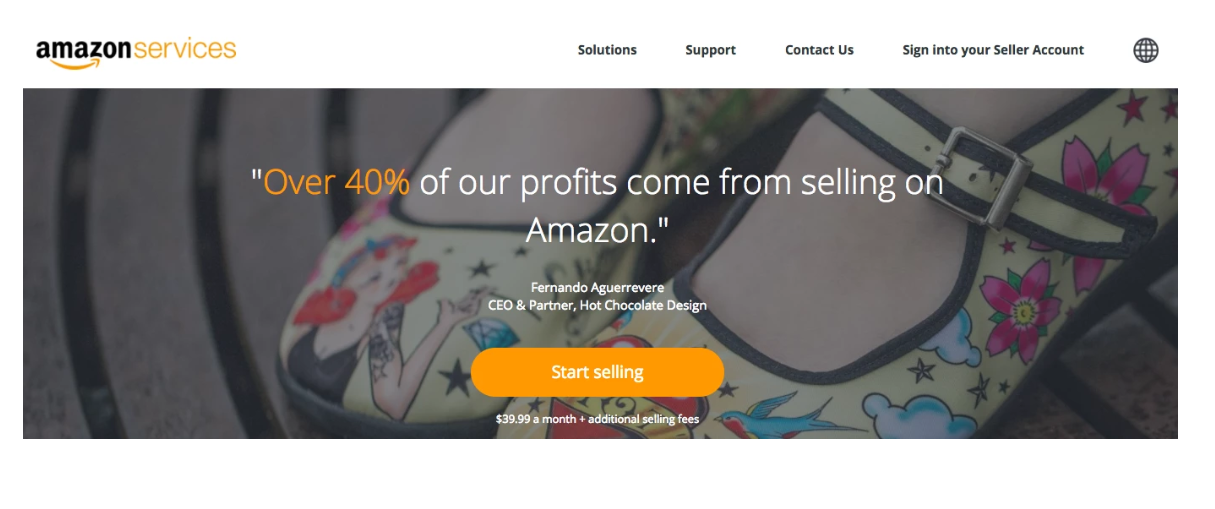
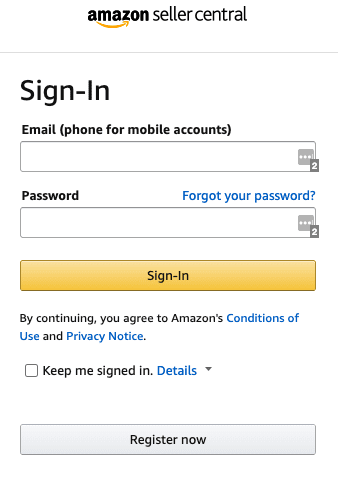
Next, create an account by filling up the registration box with your name, email address, and password.
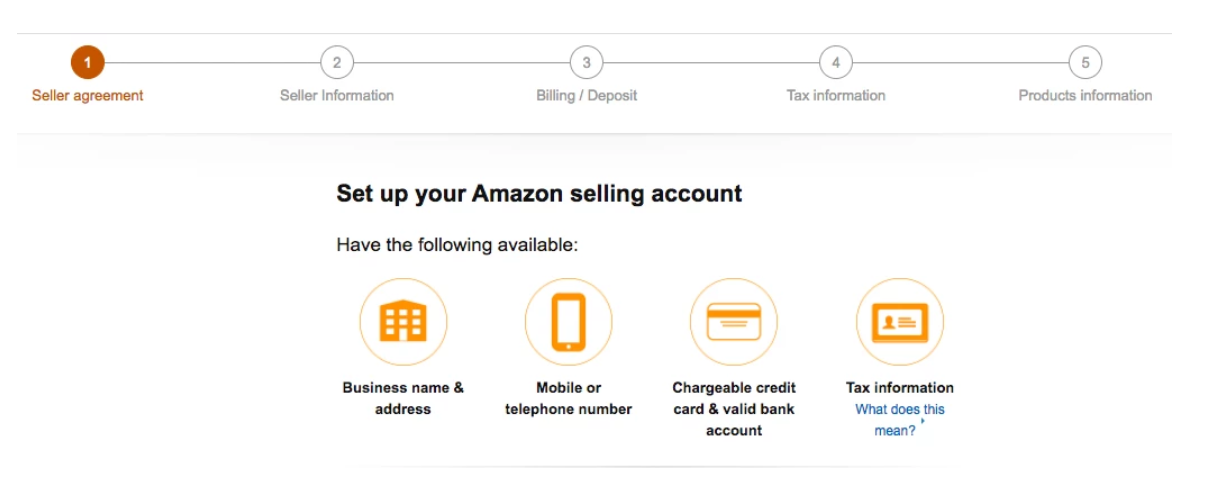
Consequently, you will be led to a five-step procedure to finish your account setup. You need to input the following information:
- Business name
- Business address
- Phone number
- Credit card information for the monthly fees
- Bank account information for sales proceeds deposit
- For US taxpayers, a Taxpayer Identification Number
The Amazon Sales Channel is free, so you can add this feature. However, the company will charge $39.99 plus a product category-based referral fee.
Apply for a category approval
After making your professional seller account, try to check if the categories of your products fit into the Amazon product criteria. This will be a signal for you to advance your application.
Add Amazon sales channel to your designated Shopify store
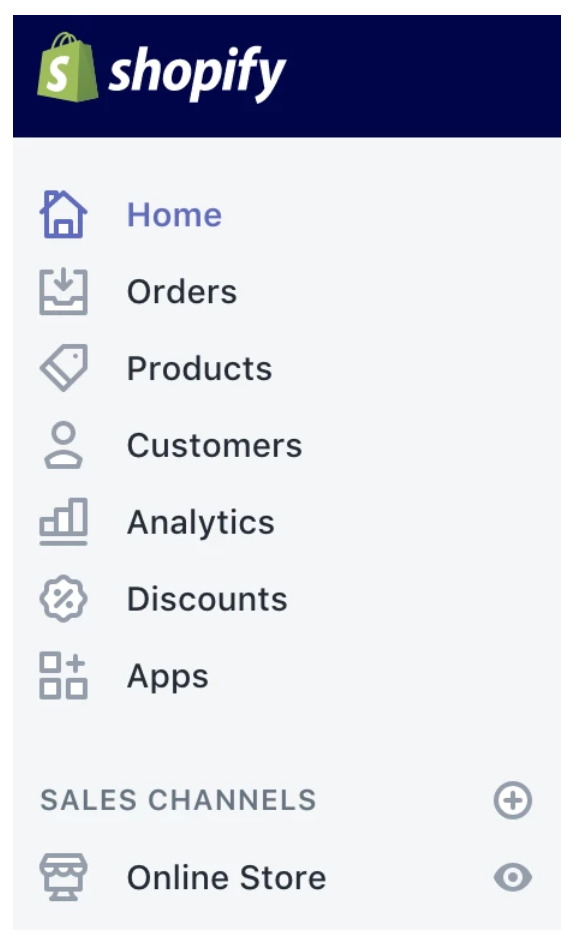
After seller registration, combine your Amazon Sales Channel with your Shopify account. Just click the “+” button located next to Sales Channels. To confirm, click “Add channel”.
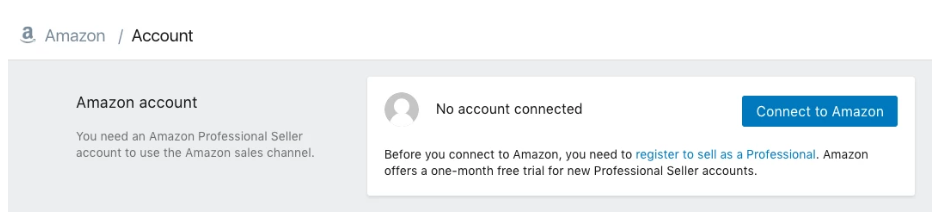
Lastly, click “Connect to Amazon” to finalize Amazon integration to Shopify. Follow the prompts to allow information sharing between your Shopify and Amazon accounts. Once you’re done, you will be redirected to your Shopify page.
How to import products from Amazon to Shopify?
Let’s explore the basic steps of dropshipping from Amazon to Shopify:
- Set up an online store with Shopify: Log in to the Store and install The Multichannel Amazon Importer.
- Continue registration for the Multichannel Importer and connect your Amazon seller account with Shopify.
- Integrate Shopify with your Amazon account: It’s the simple connectivity procedure wherein you link your Amazon Seller Panel to the Shopify app.
- Click on the Link your Account button.
- Enter your Account name and country (the one your Amazon account is from).
- Fill in your Token and Seller ID from your Amazon seller account.
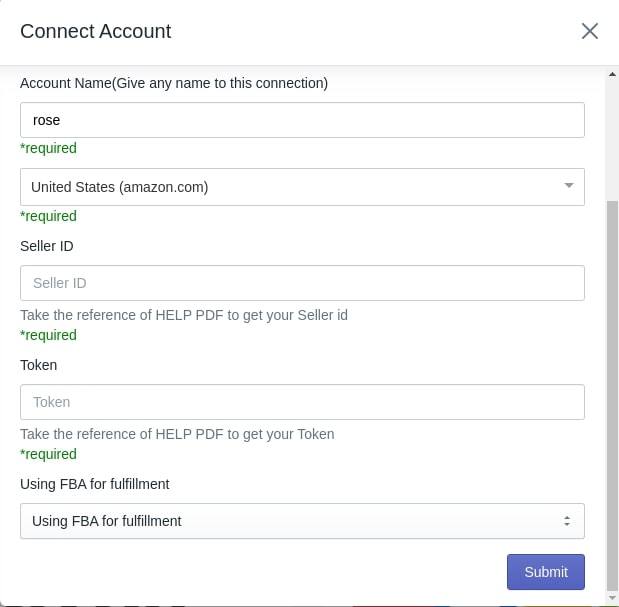
Then, you will be forwarded to the Import/Upload page of the Shopify app.
- Import/upload procedure: After having finished the onboarding steps, proceed with the following actions:
- Import your items from Amazon to the Importer App: After connecting the Control Panel of your Amazon Seller Central to the application, you can start importing product items from Amazon to the Importer app.
- Upload Products: After adding your goods to the Multichannel Importer app, you can simply import Amazon products to Shopify. There are three different ways to do this:
- Bulk Upload: You will upload all the items on Shopify that are copied on the Importer app from Amazon.
- Select and Upload: You have the option to choose the particular products for upload.
- Profiling
Profiling
It means the process of grouping products from Amazon based on product characteristics such as vendor, product title, and so on to list them promptly on Shopify. You are free to use:
- Default Profiling: Sellers can upload all the items to their Shopify account, depending on the number of item credits with no regard to the vendor, product type, etc.
- Custom Profiling: Sellers can upload items specifically depending on product type, brand, category, vendor, quantity, etc.
How to Create a Dedicated Profile on the App?
The Importer application helps sellers to choose the source and destination for their products. Therefore, they need to enter the following data:
- Profile Name
- Item Imported (the Amazon platform)
- Item Destination (the Shopify app)
It allows sellers to choose products they want to upload, for example, with the product, operator, attribute, and value.
Sellers can opt for any one of the following:
- Only active items
- Only inactive items to synchronize with their Amazon account.
- All items
Purchase universal product codes for your products
Buy and use a product identifier. This allows you to create new product pages. It will also allow you to present listings on the Amazon website. The most commonly used product identifier on Amazon is the Universal Product Code (UPC). If you fail to provide a UPC, ISBN, or EAN, then the listings are deemed invalid. Thus, as a solution, you either add a product identifier to make a page detail for your new product or finish your inventory offering on the Amazon website.
Make Amazon listings of your products
If you are not currently joined with Amazon and your products are in a supported category, you can create your product listings directly from Shopify. Go to Amazon to navigate your pre-installed Amazon Sales Channel.
Next, click on “Create Listings” and find the product from your Shopify catalog that you want to enlist in your Amazon account. Click “Select Product” at the bottom right corner. Choose which category you belong to either a seller of your actual brand or a reseller.
Fill in the details directly if you are selling your brand. But, if you are a reseller, click the “Search” button to see identical products on Amazon. Once you will see matches of your product items, click “Select” and make an offer to sell the same items. Fill in the details of the product afterward and click “Publish”.
Claim Amazon product listings in your Shopify store
Claim existing product listings in your Shopify account if you are already a registered Amazon seller. Nevertheless, if you want to sell categorically unsupported products, you can make listings on your Amazon store and add them to Shopify after.
To make pre-existing listings available that are associated with your Amazon Professional Sellers account found on your Shopify page, select “Link Products”. A link to your Amazon listing will appear. Click “Browse Products” to search for the items that you want to link to your Shopify account and add other varieties of products from your inventory.
Set and manage your inventory tracking policy
To create listings in Shopify, you may choose from the following:
- manually input and manage your Amazon product inventory
- use 3rd-party applications
- use the Shopify inventory settings.
Shopify’s inventory settings need you to input on-hand inventory value open for buying for Amazon buyers. The preset inventory value automatically reduces as purchases are being made, and you have to manually fill the inventory after.
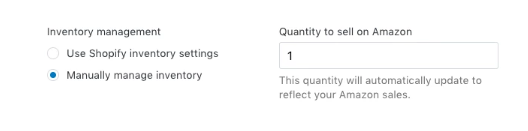
Choosing Shopify store inventory settings leads you to three possible situations:
- inventory tracking
- no inventory tracking,
- allowing customers to still purchase an out-of-stock product.
Here is a breakdown for each scenario:
- Inventory tracking. This allows Shopify to routinely update your Amazon listings to match your Shopify inventory.
- No inventory tracking. Item inventory is set to 100 in Amazon Seller Central; but, this won’t display on Shopify. It should be noted that Amazon does not support unquantified inventory, so the numeric value 100 is only a placeholder. Thus, the said quantity decreases as you sell products but mechanically restocks every 10 minutes.
- Allowing customers to still purchase an out-of-stock product. Product inventory that is not carefully updated or is out-of-stock may still appear on Amazon. The placeholder of 100 as an inventory number in Amazon Seller Central won’t show the same on Shopify. What makes this adverse is that it restocks every 10 minutes even if purchases are being made.
It should be noted that your integrity as a seller is primarily dependent on your customer reviews. Hence, this is attained through focus, honest inventory presentation, and on-time order shipments.
Start your business
Your transactions on Amazon habitually link with Shopify through the Orders page. All new purchases made on Amazon appear on your orders list. Moreover, Shopify matches all the orders including those that haven’t been enlisted. Now, you are all set to sell products from Amazon on Shopify.
Your customers will receive order notifications from Amazon alone. As for your part as the seller, you will receive updates from both Amazon and Shopify. You must fulfill your order through Shopify though. If not, you won’t receive any order updates.
On a final note, it is wiser to fulfill shipments through the use of the Shopify application FBA Shipping feature. It’s hassle-free. This is because it computes the right shipping costs or even free shipping based on the total purchase price of the items in the customer’s cart.
To use the FBA shipping, just go to Shopify Checkout settings. Then, click “Automatically fulfill the order’s line items.” You can also click on “Automatically capture payments for orders” so that you can get paid. Once these two settings are updated, you can now steer your Shopify page, sell your Amazon products, and let Amazon’s FBA fulfill the shipment. For many users, learning how to trade books on the platform is one of the best ways to figure out all the processes and start online selling. Look for our book-selling tips and find out how to succeed in the niche.
Can Shopify Sell on Amazon?
With all that said about Amazon selling on Shopify, you might ask this question: “Can I sell Amazon products on Shopify?” The answer is Yes. Shopify offers so much flexibility. This is a very important part as it mixes itself with Amazon in the world of marketing.
Shopify is a complete e-commerce platform. This allows you to start, promote, and manage your business actions. Its versatility gives certain benefits to its users. It allows you to choose from its wide variety of templates. This can let you customize your online store according to your preferences as well.
The blogging platform on the WordPress site and SEO Analytical toolkits are also included in the package for page promotion. It also allows you to expand your sales channels through their affiliate links and social media connections.
Aside from Shopify giving creative chances to develop your unique product branding, they also give you rights, mostly the domain site, of your web store. It also offers a 30-day free trial for you to see if you are likely to make enough sales volume to justify the operating expenses incurred on both platforms.
This is the key if you are considering business expansion. Most of all, marketers who are selling branded products on Shopify can sign up for Amazon Brand Registry. This feature offers further defense and control over your registered product listings.
On the other hand, there are some cons to consider. You can only Shopify and sell on Amazon in either the US or Canada. To connect Shopify to Amazon, you must have a professional seller account on Amazon. You have to pay an 8 to 20 percent referral fee in addition to your Shopify maintenance cost as well. Also, your Shopify products must match the Amazon product categories.
Final Thoughts
Shopify is hosted and fully cloud-based, allowing users to access and run their business anywhere with an internet connection. This special feature allows sellers to reach the full potential of their business.
Amazon grabbed this opportunity and took the greater leap to meet the growing demands and needs of its users by expanding its sales channels with Shopify. This new era of marketing strategy has taken e-commerce to a whole new level. It has now made business transactions real-time, dynamic, and easy, creating endless chances for sellers and better connections to millions of consumers all around the world.
And, of course, don’t forget to get positive feedback from your customers. It will lead to better visibility, more conversions, and higher Amazon rankings. Getting more product testimonials from your shoppers is easy. And the good news is, you can receive this automatically, sparing a couple of minutes for set up.